1 Step: To bypass google account first thing you must do is select your language and hit NEXT >
- Check WiFi then select your WiFi Network then hit NEXT >

2 Step: And now you must enter your Google Account login details on this screen:
- In case if you forgot your Gmail Account or maybe you buy someones phone and now you don’t know about theGoogle Account email and password.
3 Step: Now to bypass this screen just hit Back < and again hit BACK < and from the home screen hit ACCESSIBILITY > hit YES > and now tap on “Motor & congnition“.

- From the first option enable “Touch assistant” and push on the ICON for about “2 seconds” in the right corner of your screen > then push on HOME icon also for 2 seconds.
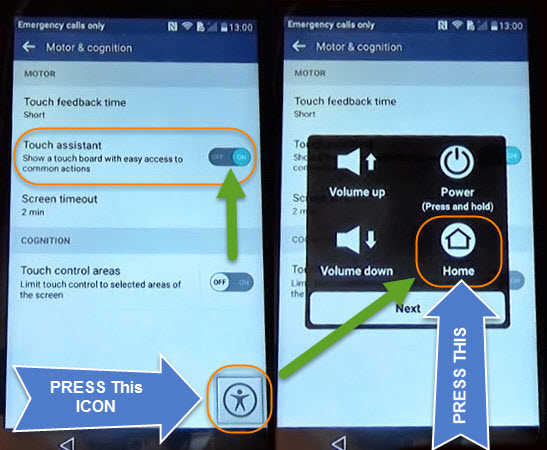
- Then you’ll have access to Google Chrome, hit > No Thanks and in the search bar type “Settings” and tap on the “Settings Gear“.
If you get “COMPLETE Setup to Continue” Error Use:
4 Step: Now you’ve access to the settings of your phone, Scroll down and tap on Apps
- Tap on “:” at the top screen corner of your phone.
- Tap on > Show System then scroll down and find Setup Wizard

- Open it and tap on Disable, and select Yes to disable it.

5 Step: And once you done that press Power button and tap on Power Off and restart.
- When the phone restarted hit NEXT > hit again NEXT > then you’ll see a screen of Legal Documents

- then see the ICON in the right corner of your screen move it and then select I Agree > Check on I agree again and tap on DONE.
Bypass Google Account on LG K8 Completed
Congratulations, Bypass Google Account on LG K8 is completed. Now you have access to your phone again now we have to Reset phone to properly remove the errors and FRP lock.
Soft Reset LG K7, K8, K10 after unlocked FRP:
Go to Settings > General > Backup and Reset > Factory Data Reset > Reset Phone and finally tap on Delete all and wait until your phone will restart.

Now you can setup your phone like new, You can add your Gmail Account and start using your phone again.